The APyT spectrum alignment command line script
The alignment of mass spectra obtained from atom probe measurements follows a conventional sequence of corrections:
Voltage correction — Adjusts peak positions relative to the applied tip voltage.
Flight length / hit position correction — Corrects peak shifts depending on the ion impact position on the detector.
Final alignment — Refines the time-of-flight offset \(t_0\) and the nominal tip–detector distance \(L_0\) to ensure accurate positioning of the peaks in the mass spectrum.
Note
The time-of-flight offset \(t_0\) and tip–detector distance \(L_0\) are intrinsic machine parameters. In a well-calibrated atom probe, \(t_0\) is typically within a few nanoseconds, while \(L_0\) may vary slightly depending on the specimen, its mounting, and the measurement chamber setup.
Invoking the command line script
The script apyt_spectrum_align is installed automatically when following the
installation instructions. It requires a single positional
argument (the measurement ID in the database). Additional optional arguments are
available, but defaults usually suffice. For a full list, run:
apyt_spectrum_align --help
Three commonly used options are:
--no-sql— Do not connect to an SQL database. Instead, load measurement data and metadata from a local database. This is the typical mode for testing or local use.--cache— Load measurement data from a binary NumPy.npyfile in the working directory. This avoids repeated file parsing or database queries and speeds up subsequent runs.Note
The cache file is created automatically on the first run and reused for subsequent runs on the same measurement ID.
Note
This option only takes effect when the measurement data is retrieved from the SQL database.
--check-voltage— Inspect the voltage evolution during the measurement. This option helps verify stable measurement conditions and identify a suitable interval for spectral analysis.
A typical invocation might look like:
apyt_spectrum_align --no-sql 1
Graphical user interface
Running apyt_spectrum_align opens a graphical interface for interactive
alignment. The example below shows a tungsten reference measurement:
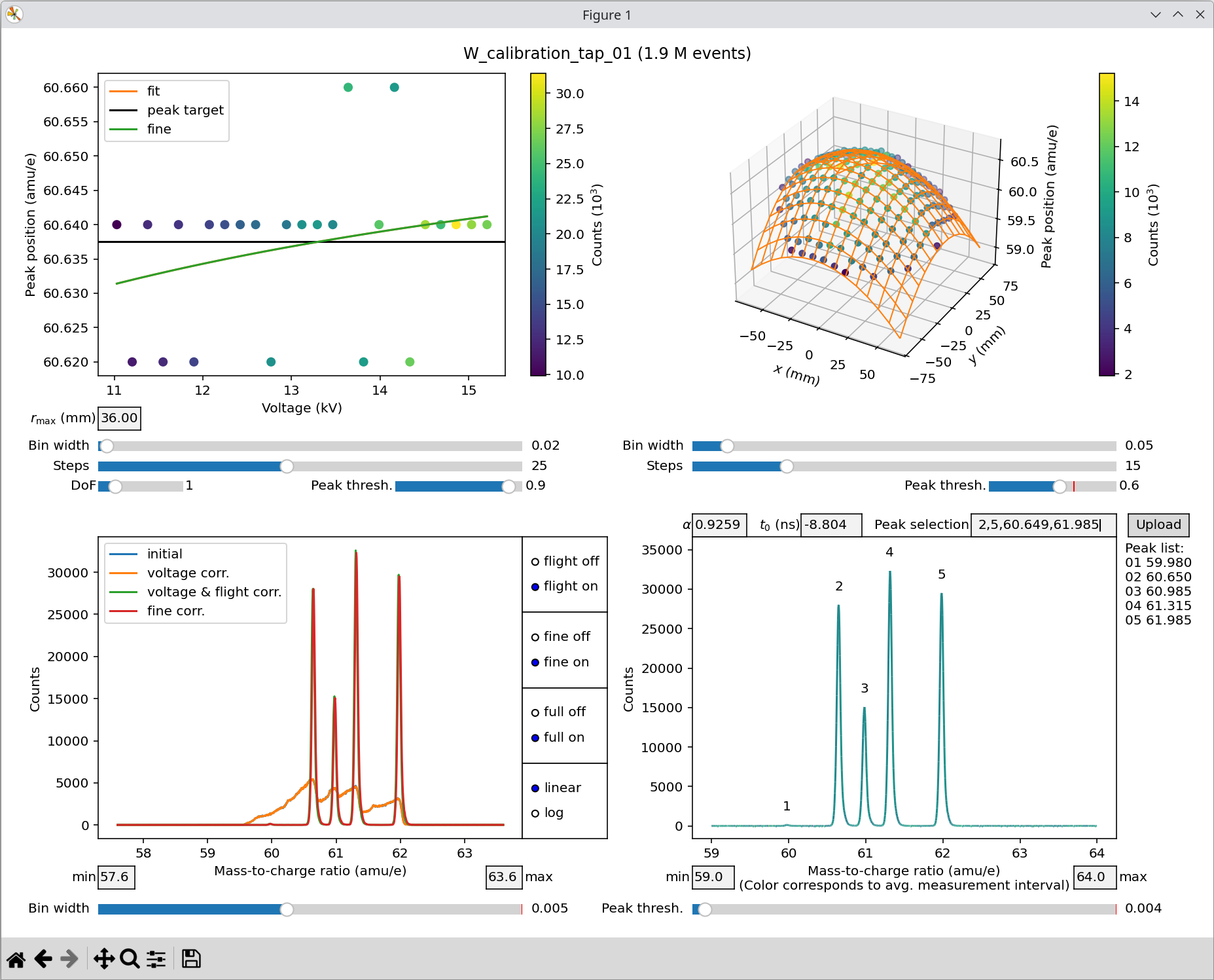
Exemplary mass spectrum calibration for a tungsten measurement using the
apyt_spectrum_align command line script.
The interface is divided into four panels:
Top left — Voltage correction
Top right — Hit position correction
Bottom left — Correction window
Bottom right — Peak position alignment
Voltage correction
Voltage correction compensates for peak drift with applied voltage. The measurement is divided into voltage segments, and the position of a chosen peak is tracked. Colors in the plot represent ion counts per segment.
Key sliders (defaults are usually sufficient):
r_max — Maximum detector radius to include (default: 60%). Hits outside this range are ignored.
Bin width — Vertical axis resolution and granularity of peak detection.
Steps — Number of voltage segments (horizontal axis).
DoF — (Internal) degrees of freedom for the correction fit.
Peak threshold — Relative threshold (default: 90%) to select peaks for tracking if multiple candidates exist in the bottom left correction window. The first candidate above the threshold is used for tracking.
Tip
The peak threshold is the most sensitive setting. Lowering it can improve consistency when multiple peaks of similar intensity are present.
Peaks are aligned to the black target line (weighted average across all segments). The orange fit line describes the fitted drift with voltage.
Note
The effect of the voltage correction is usually minor compared to the hit position correction.
Hit position correction
The flight length / hit position correction (top right) accounts for variations of the peak position across the detector. The available sliders behave similarly to those in the voltage correction step, but the visualization is three-dimensional:
Bin width — Resolution of peak position detection.
Steps — Number of segments/grid points the detector is divided into along the x and y directions.
Peak threshold — Relative threshold for peak tracking (see voltage correction).
In most cases, the default values work well. If the orange fit grid closely matches the data points, the chosen parameters are appropriate.
Note
By definition, no correction is applied at the detector center. Other peak positions are internally shifted toward this center during correction.
Correction window
The correction window (bottom left) is centered automatically on the strongest peak. You can adjust the range manually with the min and max fields. The bin width slider controls spectral resolution.
Radio buttons toggle features:
flight off/on — Toggle flight length / hit position correction.
fine off/on — Toggle fine correction.
full off/on — Toggle full-spectrum plotting (bottom right panel).
linear/log — Switch between linear and logarithmic scale.
Note
The order of some toggles is mutually exclusive. If you enable or adjust certain sliders or fields, other toggles may be automatically disabled by design to prevent conflicting settings. You can simply re-enable these toggles if required.
This panel overlays spectra at different correction stages:
Blue — Raw spectrum
Orange — After voltage correction
Green — After hit position correction
Red — After fine correction
Fine correction
Discretization from above corrections can leave small errors. Fine correction refines the analytical correction functions to maximize peak sharpness by optimizing the fitted coefficients (orange line and grid). If these fits are reasonable, fine correction usually produces the sharpest possible peaks automatically.
Peak position alignment
The full spectrum (bottom right) is used for final peak alignment. Detected peaks appear in a list on the right. The peak threshold slider determines which peaks are listed, relative to the strongest peak in the selected range, defined by the min and max fields.
Alignment requires two parameters:
\(\alpha\) — Scaling factor for the nominal distance \(L_0\)
\(t_0\) — Time-of-flight offset
To perform the alignment, select two identified peaks from the list on the right and provide their exact reference positions in the peak selection field as a comma-separated list. For example, for the tungsten measurement:
2,5,60.649,61.985
Paste values with CTRL+V. Repeat as needed until the alignment is
satisfactory.
Attention
Always use the exact isotope mass. Do not round to integers or fractions for higher mass-to-charge states.
Note
Alignment accuracy is limited by the binning width specified in the correction window and should be within \(\pm 2\) bins.
A correct calibration should yield \(\alpha \approx 1\) and \(t_0\) around a few nanoseconds.
Attention
While manual editing of \(\alpha\) and \(t_0\) is possible, automatic alignment via the Peak selection field is generally recommended. In manual mode, only the full spectrum plot in the bottom-right panel is updated, under the assumption that voltage and hit position corrections are independent of the exact values of \(\alpha\) and \(t_0\).
Finally, the Upload button saves adjustment parameters to the database. Upload also occurs automatically when closing the window.
See also
For further technical details, see the spectrum alignment module.